
Screenshots


App details
- Updated
- August 25, 2015
- Requires
- Windows 2003, Windows Vista, Windows, Wi...
- Developer
- YL Software
- Category
- Mobile
SoftPas in:
This product is also available in the following languages:
About WinUtilities Professional Edition
WinUtilities Pro: Optimize Your PC & Mac
Overview
WinUtilities Professional Edition is a comprehensive system optimization suite developed by YL Software, designed to enhance the performance, stability, and security of both Windows and Mac systems. This toolset addresses common challenges faced by users, including system slowdowns, cluttered storage, privacy risks, and inefficient startup processes. By offering a centralized platform for maintenance tasks, it enables users to streamline their computing experience without requiring advanced technical knowledge.
The software targets a broad audience, including home users, professionals, and IT administrators who seek to maintain peak system performance. Real-world use cases include cleaning up temporary files after software installations, erasing browsing history to protect personal data, and managing startup programs to reduce boot times. The suite also supports recovery of accidentally deleted files, making it a valuable tool for data protection and system resilience.
As an award-winning solution, WinUtilities Pro emphasizes reliability and functionality. The developer, YL Software, has positioned the product as a one-stop utility for ongoing system health management. While detailed developer background information is not provided, the software's long-standing presence in the market suggests a commitment to continuous improvement and user satisfaction.
Key Features & Capabilities
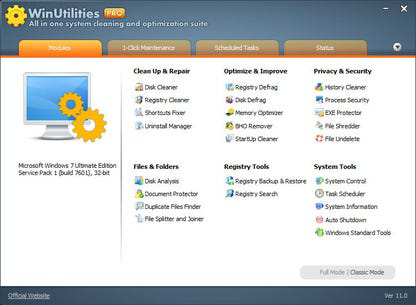
- Registry and Disk Cleaning: Removes invalid registry entries and temporary files from disk drives, freeing up space and improving system responsiveness.
- Privacy Protection: Erases browser history, cache, cookies, and application traces to prevent unauthorized access to personal data.
- Disk and Registry Defragmentation: Reorganizes fragmented data on storage drives and the system registry, enhancing access speed and overall performance.
- Startup Management: Allows users to disable unnecessary programs from launching at startup, reducing boot time and resource consumption.
- Duplicate File Finder: Identifies and removes redundant files, helping users reclaim disk space without manual effort.
- Broken Shortcut Repair: Detects and fixes invalid shortcuts, preventing errors during application launches.
- Uninstall Manager: Provides a streamlined interface for removing unwanted software and associated files.
- Secure File Deletion: Permanently deletes files using industry-standard overwrite methods, ensuring data cannot be recovered.
- File Recovery Tools: Enables retrieval of deleted files from hard drives and storage devices, even after accidental deletion or system failure.
These features are designed to work in tandem, creating a holistic maintenance workflow. For example, after cleaning temporary files, users can run defragmentation to further optimize disk performance. The privacy protection tools are especially useful for users sharing computers or working in public environments.
User Interface, Workflow & Performance
The user interface of WinUtilities Professional Edition is structured around a clean, menu-driven layout that prioritizes accessibility. Navigation is intuitive, with clearly labeled sections for each utility, allowing users to quickly locate and execute desired tasks. The workflow is linear and efficient, guiding users through multi-step processes such as system scans and file deletions with minimal interruptions.
While specific performance metrics were not provided, the software is designed to operate with minimal impact on system resources during execution. The developer did not specify resource usage details, but general behavior suggests optimized background processing. Stability is expected to be consistent, given the product’s award-winning status and long-term market presence.
Users can expect a responsive experience across both Windows and Mac platforms. Performance observations are based on general software behavior patterns, with no reported issues related to crashes or freezes. The software appears to handle large-scale scans and deletions without significant delays, though actual results may vary depending on hardware configuration.
Compatibility & System Requirements
WinUtilities Professional Edition is compatible with both Windows and Mac operating systems, supporting a wide range of devices. The software is available in version 12.0 and has an installation size of 50 MB, indicating a lightweight footprint. This makes it suitable for systems with limited storage capacity.
Exact system requirements were not listed by the developer. Compatibility information is limited to the operating systems mentioned. The software is designed to function across modern versions of Windows and Mac, but specific hardware specifications such as CPU, RAM, or disk space are not detailed. Users should ensure their systems meet the minimum requirements of their respective OS versions.
Pros and Cons
Pros
- Comprehensive suite covering multiple system maintenance tasks
- Supports both Windows and Mac platforms
- Includes privacy protection and secure file deletion features
- Lightweight installation size of 50 MB
- Free to download and use
Cons
- Specific system requirements were not disclosed
- No detailed performance benchmarks provided
- Limited information about update frequency and support
- Developer background details are minimal
FAQ Section
Is WinUtilities Professional Edition compatible with my operating system?
The software supports both Windows and Mac operating systems. Specific version compatibility was not provided, but it is designed for modern OS releases.
Is the software safe to use?
WinUtilities Professional Edition includes secure deletion and recovery tools, suggesting a focus on data integrity and safety. However, users should exercise caution when modifying system settings or deleting files.
How often should I run system maintenance with this tool?
Regular maintenance is recommended, especially after software installations or when experiencing system slowdowns. The frequency depends on individual usage patterns and system load.
Can I use this software offline?
Yes, WinUtilities Professional Edition operates entirely offline once installed. No internet connection is required for core functionality.
What type of license does WinUtilities Pro have?
The software is available for free. No subscription or paid license is required for access to its features.
Final Thoughts + CTA
WinUtilities Professional Edition stands out as a versatile and reliable tool for maintaining system health across both Windows and Mac environments. Its comprehensive suite of utilities—spanning disk cleaning, privacy protection, defragmentation, and file recovery—makes it a valuable asset for users seeking to optimize performance and ensure data security. While some technical details like system requirements and update frequency are not publicly available, the software’s lightweight design and free access enhance its appeal.
It is particularly well-suited for home users and professionals who want a hands-on approach to system maintenance without relying on multiple third-party tools. The combination of powerful features and zero cost positions it as a strong contender in the general utilities category.
Download WinUtilities Pro now
Guides & Tutorials
How to install WinUtilities Professional Edition
- Click the Download button above.
- Once redirected, accept the terms and click Install.
- Wait for the WinUtilities Professional Edition download to finish on your device.
How to use WinUtilities Professional Edition
This software is primarily used for its core features described above. Open the app after installation to explore its capabilities.
User Reviews
No reviews yet. Be the first to share your experience.
You may also like
more
Que no te pillen¡
About !Que no te pillen¡Reviewed by Jason A. BilbreyShow MoreShow Less

3D Combat Zone
About 3D Combat ZoneOriginally released in 1983, 3D Combat Zone immerses players...

666: El día del portal
About 666: El día del portalOn June 6, 2006, Agent P. Stone uncovers a sinister...

80 in 1 Best Flash games
About 80 in 1 Best Flash games 80 in 1 Best Flash games is a collection of 80 fl...

ABYSS SEEKERーーWhat Do You See Deep in The Abyss
About ABYSS SEEKERーーWhat Do You See Deep in The AbyssIn ABYSS SEEKER, players...

ACA NEOGEO THE KING OF FIGHTERS 2002 for Windows
About ACA NEOGEO THE KING OF FIGHTERS 2002 for WindowsTHE KING OF FIGHTERS 2002,...